How SQA Engineers Can Use AI: A Simple, Practical View
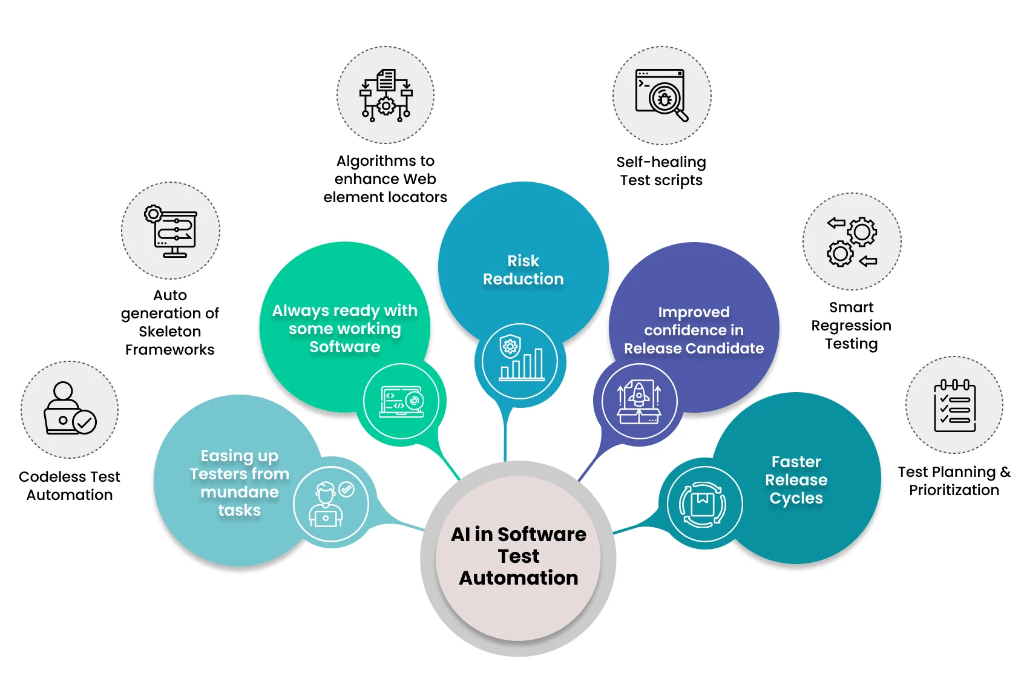
Introduction
Let me be honest: I'm tired of the AI hype in testing.
Every conference, every LinkedIn post, every vendor pitch—it's all "AI will revolutionize testing!" and "Manual testers will be obsolete!" It's exhausting. And worse, it's misleading.
Here's what I've actually seen in real projects: AI is useful. Sometimes very useful. But it's not magic, and it's definitely not replacing anyone.
The problem is that most discussions about AI in testing are either too technical (talking about ML models and neural networks) or too vague (promising to "automate everything"). Neither helps a working QA engineer figure out what to actually do with AI.
So let me cut through the noise and share what I've found actually works. No hype. No buzzwords. Just five practical ways AI genuinely helps SQA work—based on what I've used and seen work in real teams.
1. Helping Write Better Test Cases Faster
Creating test cases takes time, especially when requirements are unclear or constantly changing. AI can help by reading requirements, user stories, or previous test cases and suggesting test scenarios.
This does not replace thinking. Instead, it gives a starting point. AI often highlights edge cases or alternative flows that might be missed when working quickly. The tester still reviews and improves the test cases, but the initial effort is reduced.
In practice, this means less time writing and more time reviewing and improving quality.
2. Making Regression Testing Smarter
Regression testing ensures new changes do not break existing features, but running everything every time is rarely efficient. AI helps by analyzing past defects, recent code changes, and failed tests to suggest where problems are most likely to appear.
This allows testers to focus on high-risk areas first instead of testing blindly. It saves time while still protecting critical functionality.
The key benefit is prioritization, not automation alone.
3. Spotting Problems in Logs and Test Results
Modern systems generate a lot of data. Logs, error reports, performance metrics, and test execution results can be overwhelming.
AI can scan this data to identify unusual patterns, repeated failures, or slowdowns that deserve attention. This is especially useful for catching flaky tests or hidden performance issues.
AI does not explain the problem for you, but it points you in the right direction faster.
4. Catching Requirement Issues Early
Many defects come from unclear or incomplete requirements. AI tools using language analysis can help flag ambiguous wording, missing scenarios, or inconsistent rules in requirements and user stories.
This helps testers raise questions earlier, before development and testing time is wasted. Early clarity almost always leads to better quality later.
In simple terms, AI helps reduce misunderstanding before it turns into bugs.
5. Supporting Continuous Testing in Fast Releases
In fast-moving teams, testing must keep up with frequent changes. AI helps automation stay relevant by adapting to small UI or flow changes and by analyzing failures more intelligently.
This reduces test maintenance effort and keeps test feedback flowing even in continuous delivery environments.
Conclusion
Here's my take: AI is a tool, not a replacement.
I've seen teams waste months trying to implement AI solutions that promised to "revolutionize" their testing, only to end up with overcomplicated systems that nobody understands or maintains. I've also seen teams use simple AI-powered features—like log analysis or test case suggestions—and get immediate, measurable value.
The difference? The successful teams treated AI as an assistant, not a savior.
They used AI to handle the repetitive stuff: scanning logs, suggesting test scenarios, identifying patterns in failures. And that freed up human testers to do what we're actually good at—thinking critically, understanding context, and making judgment calls that no algorithm can make.
So my advice? Start small. Pick one specific problem AI can help with. Maybe it's analyzing your flaky tests. Maybe it's helping write initial test cases. Maybe it's spotting patterns in production logs. Use it, measure the impact, and decide if it's worth expanding.
Don't try to "implement AI in testing." That's too vague. Instead, ask: "What repetitive, pattern-based work am I doing that a machine could handle better?"
Because at the end of the day, AI handles patterns and data. Humans handle judgment, context, and responsibility. And honestly? That division of labor works pretty well.
The future of testing isn't "AI or humans." It's AI and humans, each doing what they do best. And I'm completely fine with that.